How to Find an Email Using Just a Company Name
No domain on hand? Here's how to go from a company name alone to a verified email address, and when this approach won't work.

Sometimes all that's on hand is "she works at Acme" with no domain attached. That's a real starting point, not a dead end, but a company name introduces a step that a domain skips entirely: figuring out which domain the name actually points to, before any of the usual pattern-and-verify work can begin.
Yes - skip straight to finding the email by domain, a company name isn't needed at that point.
No, only the company name - resolve the name to a domain first, rule out similarly named companies, then follow the domain-based process. That's what the rest of this guide covers.
No domain, and the name is generic or ambiguous - confidence drops here. A tool that accepts a company name directly can still attempt the resolution automatically, but a direct source for the domain, a LinkedIn profile, a business card, an email signature, is worth more than continuing to guess.
The path from a name to a usable address looks like this:
- Company name. What's known at the start.
- Find the official domain. Resolved and confirmed against a second source.
- Find the email pattern. Learned from the confirmed domain.
- Verify the email. Checked against the mail server before it's used.
Why a Company Name Alone Isn't Enough on Its Own
A domain is unambiguous. acme.com points to exactly one place, and every email pattern check that follows is built on that certainty. A company name doesn't have that property. "Acme" could be a manufacturer, a consulting firm, or a completely unrelated business in another country, and search results don't always sort the real one to the top. The name has to resolve to a specific domain before anything else can happen, and that resolution step is where most mistakes happen.
Step 1: Resolve the Name to a Domain
A search engine query for the company name is the obvious first move, and it's usually right, but it's worth confirming rather than trusting the first result blindly. Paid ads, review sites, and unrelated businesses with similar names can all outrank the real site, especially for a generic or common name.
A second source helps confirm it:
- The company's LinkedIn page usually lists its website directly in the profile.
- A careers or job listing often links back to the official site, and confirms the company is still active under that name.
- A press mention or news article naming the company usually links to or names its actual domain.
If two of these sources agree, the domain is almost certainly right.
Step 2: Rule Out Similarly Named Companies
A generic name, a common word, or a name shared with a much bigger company in another industry is where this goes wrong most often. Before committing to a domain, a quick check against what's already known about the company catches most mistakes:
- Does the industry match what's expected?
- Does the location match, city, country, or region?
- Does the company size look right, a 5-person startup and a 5,000-person enterprise rarely share a name by coincidence, but it happens?
This step going wrong doesn't produce an obvious failure, it produces a confidently wrong domain, and every step after it inherits that mistake.
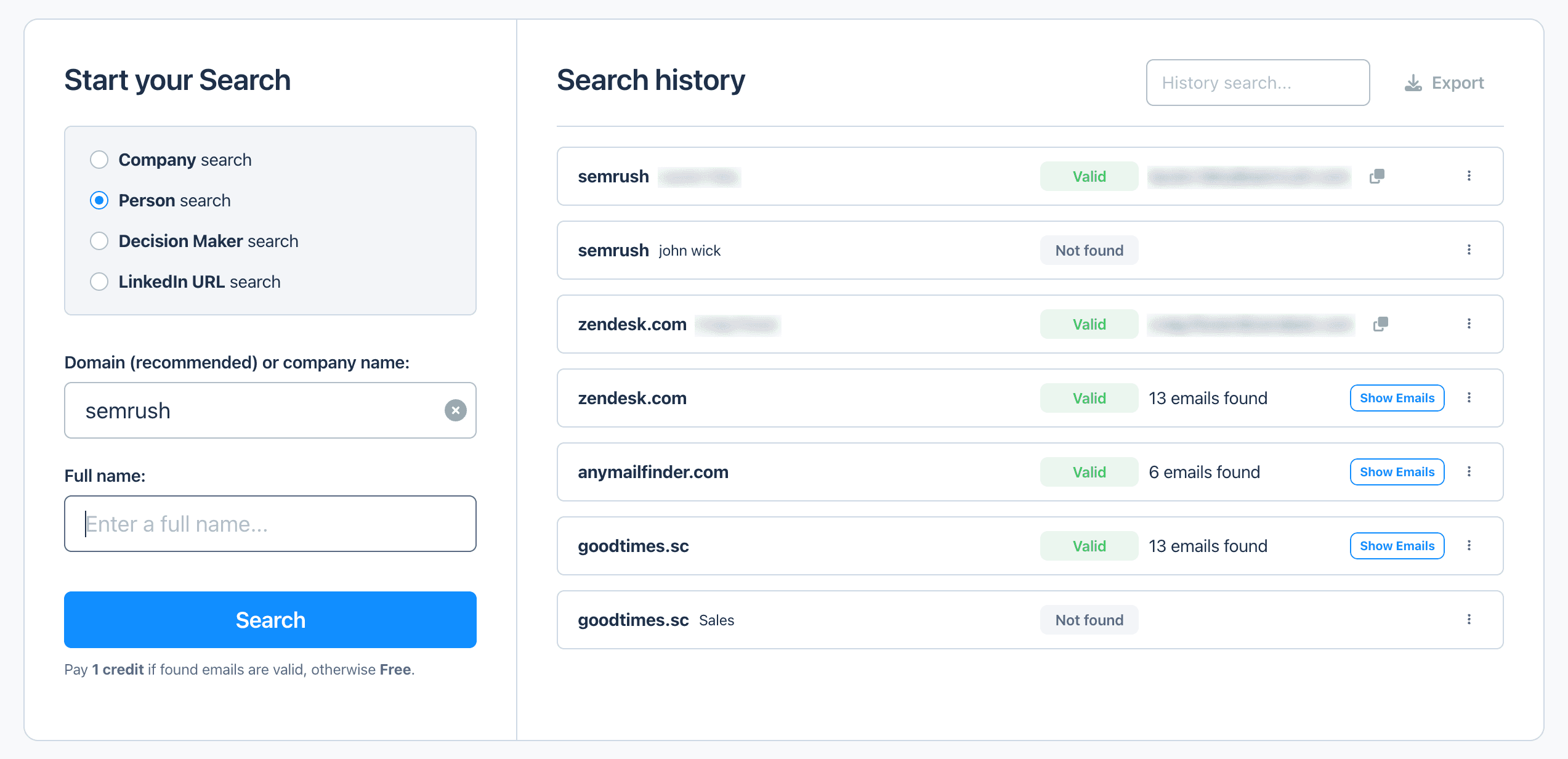
The search field takes a plain company name as well as a domain, so a search can start without one. The domain still gives better results, which is why it's the recommended input.
Step 3: Find and Verify the Email Address
Once the domain is confirmed, the rest follows the same path as starting from a domain directly, finding an existing email on the company's site to learn the pattern, matching that pattern to the person's name, and verifying the result before using it. That process is covered in detail in How to Find Someone's Email Address by Domain, worth a read if the domain-matching and verification steps aren't already familiar.
When This Approach Works Less Well
A company name works nearly as well as a domain when the company is well known and its name is distinctive. It gets harder in a few common situations:
- Holding companies and parent brands. The legal entity name on a registry or an invoice often differs from the public-facing brand, and only the brand has a usable domain.
- Multi-brand companies. A single business can operate several distinct brands with separate domains, and the parent company name alone won't indicate which one applies.
- Very generic names. A name built from common words returns too many plausible matches to resolve with confidence.
- Recently renamed or rebranded companies. Search results and directories can lag behind a rebrand for months, pointing to an old domain that no longer matches the current name.
In any of these cases, a domain confirmed through a direct source, the person's own LinkedIn profile, a business card, or an email signature, is worth more than continuing to guess from the name alone.
Common Mistakes When Searching by Company Name
- ❌ Using the parent company's name instead of the brand people actually search for. The legal entity and the public brand often point to different domains entirely.
- ❌ Picking the first search result without confirming it. Paid ads and unrelated businesses with similar names can outrank the real site, especially for a common name.
- ❌ Confusing two companies that share the same or a very similar name. A quick check against industry, location, and size catches most of these before they cause a wrong result.
- ❌ Assuming the email pattern without verifying it. A correctly resolved domain still needs the same pattern-and-verify steps as a domain search does, resolving the name doesn't skip that part.
- ❌ Treating an old directory listing as current. Rebrands and domain changes take time to propagate across search results and business directories.
Can a Tool Do This Automatically?
Some email finders accept a company name directly and resolve the domain automatically behind the scenes, removing the manual lookup covered above. Everything in this guide still applies underneath, the tool is just running steps 1 through 3 in one pass instead of by hand. Anymail Finder's Email Finder works this way, a name and a company, domain or not, are enough to start a search, and for a longer list, the same logic is available through Bulk Email Finder rather than one lookup at a time.
Frequently Asked Questions
Yes, but the company name is a starting point, not the input itself. The name needs to resolve to a domain first, then the usual pattern-and-verify process applies. Some tools accept a company name directly and handle the domain lookup automatically.
A search engine query for the company name usually surfaces the official site first, but it's worth confirming against a second source, the company's LinkedIn page, a careers listing, or a press mention, since paid ads and unrelated businesses with similar names can outrank the real site.
Cross-check industry, location, and size against what's already known about the company. A generic name like a common word or a person's first name is especially prone to collisions, and resolving to the wrong domain produces a confidently wrong result rather than an obviously failed one.
Not quite, a domain is unambiguous, a name requires an extra resolution step that can introduce errors. A well-known company with a distinctive name resolves about as reliably as a domain would. A generic name, a company with multiple brands, or a business that goes by a different legal name than its public brand all add friction.
Usually because the name doesn't resolve cleanly to one domain, a generic name, a holding company with no public-facing brand, or a business that trades under a different name than its legal entity. It can also fail for the same reasons a domain-based search would, the person doesn't use a standard company email, or the domain blocks verification.
The legal name is what's registered with a government or business registry, the domain is whatever the company chose for its website and email, and the two often don't match. A business might trade publicly as one brand, and its legal entity name, the one on invoices or a registry lookup, can be something else entirely.
Skip the domain lookup
If you'd rather not resolve the domain by hand, Anymail Finder accepts a company name directly and resolves it as part of the search.
Start a 7-day trial