How to Bulk Verify a List of Emails
A practical guide to cleaning an email list at scale, file prep, running the check, and what valid, risky, and invalid actually mean.

Checking one email at a time works fine until the list has a few hundred rows in it. At that point the question changes from "is this address real" to "how do I clean an entire list without sending to the ones that will bounce." Here's the process, from preparing the file to knowing what to do with each result once it comes back.
Why Verify a List Before You Send
A list that was accurate a year ago isn't necessarily accurate now. People change jobs, companies switch email providers, and addresses that used to work quietly stop existing. None of that shows up by looking at the list, it only shows up as a bounce after the send has already gone out.
Bounces cost more than the individual failed sends. Mailbox providers track bounce rate at the sending domain level, so a list with a high failure rate can hurt inbox placement for every email sent afterward, not just the ones that failed. A cleaner list protects the sends that come after it too, not just the one it's used for.
Prepare Your File
Most bulk verification tools expect a CSV or XLSX file with a column of email addresses. A few things worth doing before uploading anything:
- Remove duplicates. A shorter file finishes faster, and on tools that bill per check, the same address checked twice can cost twice.
- Drop obviously broken rows. Blank cells, addresses with no @ symbol, or placeholder text like "n/a" only add noise.
- Keep a header row. Most tools use it to identify which column holds the email, which matters more once other columns like name or company are in the file too.
- Don't worry about perfect formatting. Extra columns are usually fine, most tools let a specific column be selected rather than requiring email to be the only thing in the file.
A minimal file is just a single column, something like this is enough to run a first test:
email
sarah.chen@notion.so
press@hubspot.com
jane.doe@stripe.com
hello@zendesk.com
notarealuser293847@example.com
QUICK TIP Most of that prep is optional on Anymail Finder. Duplicates are only charged once every 30 days, so the same address appearing twice costs nothing the second time. Rows with a blank or malformed email are skipped automatically and never reach a mail server. The header row is detected for you, can be named anything, or left out entirely. Extra columns are kept as they are, the export hands back your original file with the result columns added in front.
What a Bulk Verification Check Actually Does
A real verification check does more than confirm an address is formatted correctly. The format itself is the easy part to check, almost any string with an @ symbol passes that test. What actually matters is confirming the domain has a working mail server, and that the specific mailbox exists on it. That second part is where a live check earns its keep over a database lookup, a stored list can be months out of date, a live check reflects what the mail server says right now.
Uploading and Running the Check
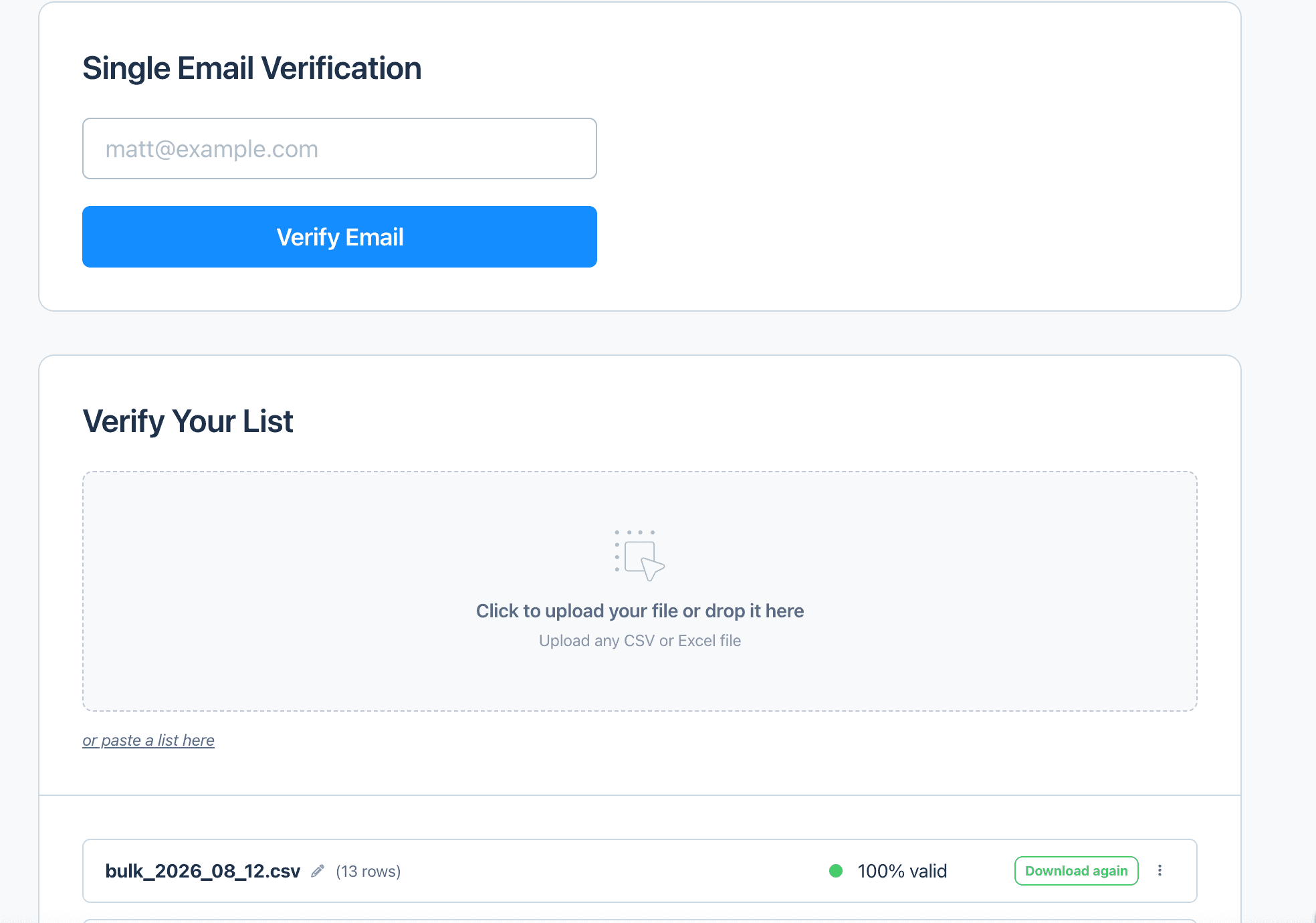
Single-address verification and bulk list verification sit on the same screen, with past runs and their overall valid rate kept in the history below.
Most tools also support pasting a list directly instead of uploading a file, useful for a quick batch without saving a CSV first.
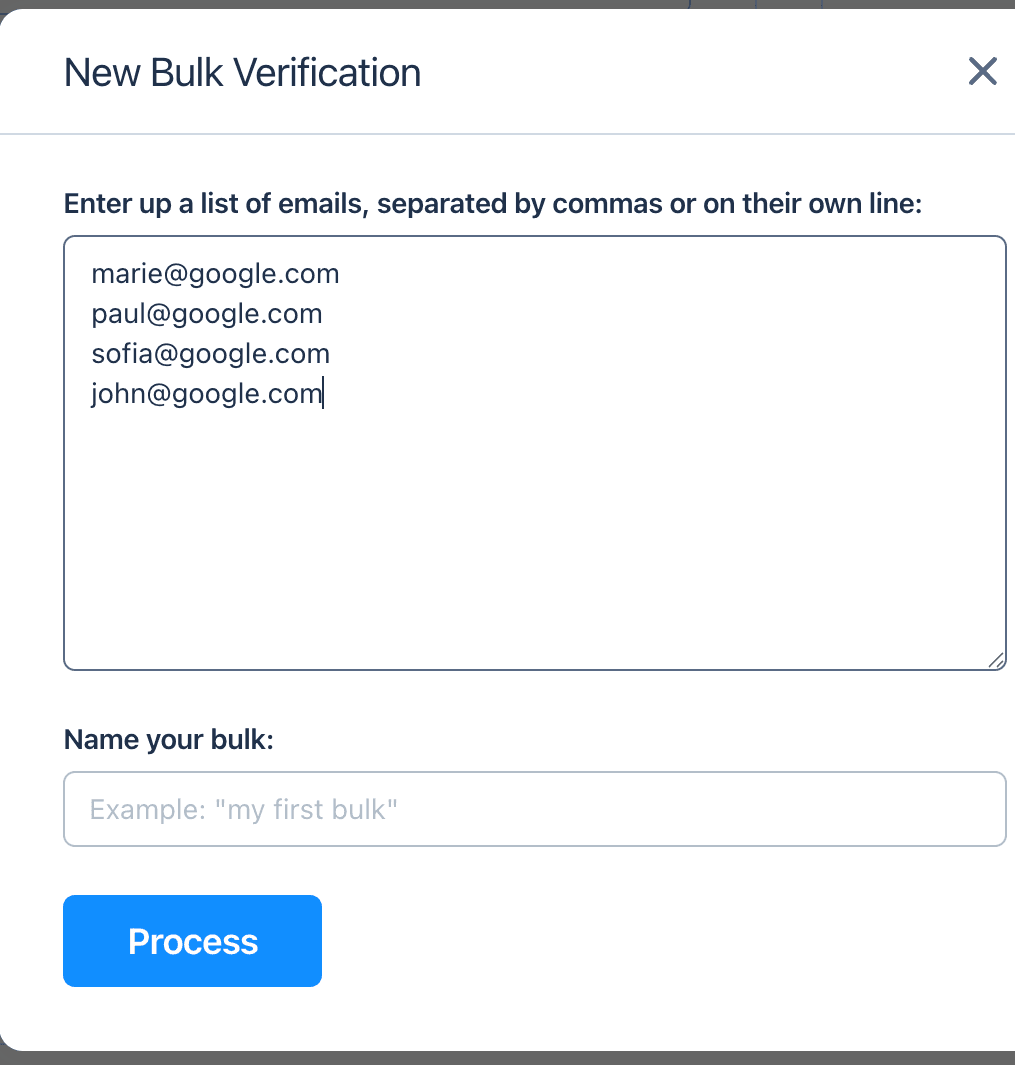
Pasting a short list directly skips the file-prep step entirely, useful for a quick one-off batch.
The process itself is usually simple, upload the file, confirm which column holds the email addresses if the tool asks, and start the check. The part that catches people off guard is that a bulk run is a queued job rather than an instant answer, since every address gets confirmed live against its mail server rather than read out of a stored list. A few thousand addresses is usually a few minutes of processing, and a very large list keeps running in the background, ready to download once it finishes rather than something to sit and watch.
Reading the Results
Once the check finishes, addresses generally come back sorted into a few categories:
- Valid: the mailbox exists and is confirmed safe to send to.
- Invalid: the address doesn't exist, the domain has no mail server, or the mailbox explicitly rejected the check.
- Risky: the check didn't come back conclusive. A catch-all domain is the most common reason, one that accepts mail sent to any address at it, so the specific mailbox can't be confirmed either way. Greylisting and temporary server errors land in the same bucket. This isn't the same as invalid, it just means the check couldn't resolve it.
The labels vary from tool to tool. Valid also shows up as verified or deliverable, and invalid as undeliverable, though in both cases the meaning is unambiguous whatever it's called. The third category is where the naming actually matters, the same result gets labelled risky, unknown, unverifiable, or accept-all depending on the verifier, and some tools simply call it catch-all. That last label is the one worth pushing back on, because catch-all describes how a domain is configured while risky describes what the check came back with. Most verifiers treat the first as automatically producing the second and write off the whole domain, while a tool that runs deeper checks on those domains can resolve many of those addresses to a clear valid or invalid instead.
| Address (example) | Mail server | Result |
|---|---|---|
| j.taylor@company.com | mimecast.com | Valid |
| l.hayes@othercompany.com | mimecast.com | Valid |
| j.porter@othercompany.com | mimecast.com | Invalid |
| marie@google.com | smtp.google.com | Invalid |
Example results, names changed. In practice, the pattern-matched addresses tied to a real person came back valid, generic first-name guesses at a domain that doesn't actually use that pattern came back invalid, exactly the kind of thing a bulk check catches before it turns into a bounce.
What to Do With Each Result
| Result | What it means | What to do with it |
|---|---|---|
| Valid | Mailbox confirmed to exist | Safe to keep and send to |
| Invalid | No working mailbox found | Remove from the list |
| Risky | Plausible but not fully confirmed | Depends on volume and risk tolerance, see below |
Risky results are the ones people get wrong most often. They aren't confirmed invalid, so a blanket removal can mean losing real, reachable contacts. For a large automated send where sender reputation is the priority, cutting them is the safer call. For a smaller, more manual outreach batch they're often worth keeping, ideally sent from a secondary domain or inbox so any bounces don't land on the reputation of the setup you rely on.
Common Mistakes When Bulk Verifying
- ❌ Verifying once and never again. A list that was clean six months ago has already started decaying, people change roles and domains get reconfigured whether or not the list itself changes.
- ❌ Sending to risky addresses at volume. This is the expensive one. Risky means the mailbox was never confirmed, so a mass send to those rows is exactly how bounce rates climb and take the sending domain down with them. If they're worth contacting at all, contact them from a secondary domain or inbox, never the one the rest of your outreach depends on.
- ❌ Assuming verification guarantees zero bounces. It lowers the odds substantially, it doesn't make bounces impossible, a mailbox valid today can go inactive before the send goes out.
Using a Bulk Verification Tool
Everything above works with any bulk verifier that checks addresses live rather than against a stored database. Anymail Finder's Email Verifier handles this for a list that's already built, upload a CSV or XLSX of up to 100,000 rows and each address gets checked against the live mail server rather than a cached record. For the separate case of not having a list yet, building one from names, companies, or LinkedIn URLs is a different starting point, covered by the Bulk Email Finder.
Frequently Asked Questions
It means checking every address on a list against the receiving mail server, rather than assuming an address works because it's formatted correctly. The output is usually a status per address, valid, invalid, or risky, so a list can be cleaned before it gets used for outreach.
A CSV or XLSX file with one column of email addresses is all that's required. Extra columns like name or company usually aren't a problem, most tools let you pick which column holds the email, but a single clean email column is the simplest starting point.
It depends on the list and the tool, since a bulk run is a queued job rather than an instant answer. As a reference point, Anymail Finder verifies at roughly a thousand addresses a minute, so a list of around 8,000 addresses finishes in about eight minutes. Files of up to 100,000 rows are accepted, and a large one keeps processing in the background, staying in your history to download once it's done.
Not automatically. A risky result means the address couldn't be fully confirmed, not that it's wrong. Cutting them is the safest option for a high-volume automated send, while for a smaller, more manual batch they're often worth keeping, sent from a secondary domain or inbox so any bounces don't affect the reputation of your main sending setup.
There's no single interval that fits every list, it's a trade-off rather than a rule. A list starts decaying the moment it's verified, people change jobs and domains get reconfigured whether or not the list itself changes, so the real question is how much bounce risk a particular send can absorb. High-volume cold outreach from a domain you can't afford to damage is worth re-checking every two to four weeks. A smaller batch, or one going to contacts you're already in conversation with, can comfortably go longer. Re-verifying the same address within a month is free on Anymail Finder, so tightening the cadence usually costs nothing.
No, it reduces bounces significantly but doesn't guarantee zero. A mailbox confirmed valid at the moment of the check can still go inactive later, and a small share of catch-all domains will accept the check but reject the actual send. Verification lowers the odds considerably, it doesn't eliminate them.
Skip the manual work
If you'd rather not check each address by hand, Anymail Finder's Email Verifier can run a whole list at once and sort the results for you.
Start a 7-day trial