
Email Finder Benchmark 2026
Most email-finder benchmarks only measure coverage - how many emails a tool returns. This one also checks whether those emails are real, running every result through three independent email verifiers. For cold email both matter: a tool has to find enough addresses to scale without filling your list with bounces.
What makes a good finder?
A good email finder has to do two things at once, and most tools are strong on one but weak on the other. This benchmark measures both, for every tool.
Does it find the email?
How many of your contacts the tool finds an email for. We count a find only when the email is later verified as deliverable.
Can you trust what it returns?
The share of returned emails that pass independent verification - so you can send without bolting on a separate verifier.
How accurate is accurate enough?
Bounce rate is a top signal mailbox providers like Gmail and Outlook use to flag spammers. Let it climb and your sender reputation drops: emails land in spam instead of the inbox, and open rates and ROI fall with them.
For cold email, the rule of thumb is to keep your bounce rate under 2%:
| < 2% | Safe to send |
| 2-5% | Risky - providers start throttling delivery |
| 5%+ | Dangerous - risk of account suspension |
Bounce-rate thresholds based on cold-email deliverability guidance (Puzzle Inbox).
We didn't take any tool's word for which emails were valid - every returned email was re-checked by three independent verifiers, not scored by the tool that found it.
 BounceBan
 ZeroBounce
 MillionVerifier
Which email finders deliver both coverage and accuracy?
Each dot is one email finder, plotted by coverage (verified-valid emails found) and accuracy (the share of returned emails that were deliverable). Farther right means higher accuracy; higher up means more verified-valid emails found. The best tools sit near the top-right.
 FullEnrichWaterfallCoverage: 87.1%
Accuracy: 95.7%
 Anymail FinderSingle-sourceCoverage: 86.4%
Accuracy: 98.9%
 GetProspectSingle-sourceCoverage: 71.2%
Accuracy: 96.0%
 FindymailSingle-sourceCoverage: 70.9%
Accuracy: 95.6%
 DropcontactSingle-sourceCoverage: 69.4%
Accuracy: 93.1%
 ApolloSingle-sourceCoverage: 68.1%
Accuracy: 91.3%
 ClearoutSingle-sourceCoverage: 60.2%
Accuracy: 79.9%
 HunterSingle-sourceCoverage: 57.6%
Accuracy: 86.1%
 SkrappSingle-sourceCoverage: 49.4%
Accuracy: 73.8%
 IcypeasSingle-sourceCoverage: 49.0%
Accuracy: 99.1%
 Snov.ioSingle-sourceCoverage: 46.1%
Accuracy: 75.3%
 FindThatLeadSingle-sourceCoverage: 45.7%
Accuracy: 66.3%
 ProspeoSingle-sourceCoverage: 45.2%
Accuracy: 92.5%
 Voila NorbertSingle-sourceCoverage: 41.3%
Accuracy: 75.4%
- Anymail Finder was the only tool to pair top-tier coverage (86.4% of contacts) with a near-zero false-positive rate (0.9%).
- FullEnrich's coverage came at a price - it returned false positives more than four times as often (4.0% of contacts vs 0.9%). Sending its list as-is would mean a ~4.3% bounce rate, above the ~2% considered safe for cold email; Anymail Finder's equivalent is ~1.1%.
Do waterfall email finders find cleaner emails?
The waterfall email finder in this benchmark, FullEnrich, queries multiple sources in sequence to increase coverage, but more sources did not automatically mean cleaner results. As a single-source tool, Anymail Finder nearly matched FullEnrich on coverage (86.4% vs 87.1%), but with a quarter the false-positive rate (0.9% vs 4.0%).
Computed as 100 minus accuracy - the share of returned emails that failed verification.
Full results: coverage and accuracy for all 14 email finders
The table shows all 14 tools, sorted by coverage: the share of the 5,000 contacts where a tool returned an email that three independent verifiers judged deliverable. Anymail Finder was the #1 single-source email finder, and the only tool to combine top-tier coverage with a bounce rate safe to send. No tool beat it on both: the one above it on coverage bounced more than four times as often, and the most accurate tool found emails for barely half of contacts.
| Logo | Provider | Coverage | False positives | Accuracy |
|---|---|---|---|---|
| FullEnrich Waterfall | 87.1% | 4.0% | 95.7% |
| Anymail Finder Single-source | 86.4% | 0.9% | 98.9% |
| GetProspect Single-source | 71.2% | 3.0% | 96.0% |
| Findymail Single-source | 70.9% | 3.3% | 95.6% |
| Dropcontact Single-source | 69.4% | 5.1% | 93.1% |
| Apollo Single-source | 68.1% | 6.5% | 91.3% |
| Clearout Single-source | 60.2% | 15.1% | 79.9% |
| Hunter Single-source | 57.6% | 9.3% | 86.1% |
| Skrapp Single-source | 49.4% | 17.5% | 73.8% |
| Icypeas Single-source | 49.0% | 0.5% | 99.1% |
| Snov.io Single-source | 46.1% | 15.2% | 75.3% |
| FindThatLead Single-source | 45.7% | 23.2% | 66.3% |
| Prospeo Single-source | 45.2% | 3.7% | 92.5% |
| Voila Norbert Single-source | 41.3% | 13.5% | 75.4% |
- Anymail Finder is the only tool green on all three columns - the only one pairing high coverage with both low false positives and high accuracy.
Which tools can find the hardest contacts?
We isolated the 629 hardest contacts - the ones only 1 to 3 of the 14 tools could find a valid email for. These are the high-value ones: rare, so your competitors are least likely to already have them, and they tend to convert better. Here is the share of them each tool reached.
How to choose an email finder
- 1Pick a finder that handles catch-all.Catch-all was 36% of our sample, and finders vary widely on it: the weakest found a fraction of what the best did, and some tools returned most of their catch-all finds flagged as "unknown" - emails you cannot safely send.
- 2Trust one tool, don't stack two.Catch-all verification comes in levels - some tools confirm a few of those mailboxes, others far more. Add a weaker verifier on top of a strong finder and it throws away valid catch-all - a third of your coverage gone. The simpler, safer path: one finder you can trust to confirm catch-all itself.
- 3Judge coverage and accuracy together.Accuracy alone is a trap: Icypeas topped the accuracy chart (99%) but found valid emails for just 49% of contacts, while Anymail Finder found nearly twice as many (86.4%). A near-perfect score is worthless if the tool can't reach most of your list.
- 4Don't overpay for a waterfall.At 50,000 credits FullEnrich costs about four times as much as Anymail Finder - roughly $2,000 versus $499 - and here that bought coverage within a point and a higher false-positive rate. It's a premium most teams don't need to pay.
Methodology and disclosures
Contact sample
5,000 B2B decision-maker contacts sourced from LinkedIn Sales Navigator, covering the United States, United Kingdom, France and Germany, across both small and large companies. Junior and entry-level seniorities were excluded. The final composition was approximately 2,570 US / 810 UK / 810 France / 810 Germany.
Inputs and counting
The same contact file was uploaded to every tool, with all available fields (company domain, company name, LinkedIn URL and so on) mapped to whatever each tool accepts - so every tool received the maximum input it could use. Each tool could return one top email per contact. Emails a tool itself flagged as invalid or undeliverable were not counted as that tool's results - no sender would use them - while emails it could not confirm ("unknown" or catch-all) were kept and independently verified.
Verification panel
Every returned email was checked by three independent, third-party verifiers: BounceBan, ZeroBounce and MillionVerifier. For standard domains, an email counted as valid only on a 2-of-3 consensus. For catch-all or accept-all domains, BounceBan adjudicated the result, because ZeroBounce and MillionVerifier generally return catch-all statuses on those domains while BounceBan is designed to resolve catch-all mailboxes. No tool's own verification status was used to score results, and Anymail Finder's engine never judged any email - including its own. Every verdict came only from the three independent verifiers.
All percentages are computed from unrounded counts and rounded to one decimal for display, so columns may not reconcile exactly when recomputed from the rounded figures.
Publisher and conflict of interest
Anymail Finder is the publisher of this benchmark. To keep it inspectable, the anonymized dataset is public, and the full underlying files are available on request at team@anymailfinder.com - kept off the public download only to comply with GDPR and other privacy laws. Anymail Finder verifies emails before returning them as part of its product model, which structurally contributes to its low false-positive rate. It did not top every metric - it placed second on raw coverage and second on accuracy - but showed the strongest overall balance across coverage, accuracy and false positives.
Limitations
This was not a live send-test - sending real email to 5,000 people who never opted in would breach GDPR, CAN-SPAM and similar laws, so an independent verifier panel is the only compliant way to judge deliverability at this scale. Every verdict therefore comes from the panel. Catch-all domains accept mail to any address and cannot be confirmed with certainty by any verifier, so those results rely on BounceBan's resolution and should be read as best-effort. The data was collected on June 19, 2026, and email-finding tools change over time. The sample is B2B decision-makers in four Western markets (US, UK, France, Germany), so results may not generalize to other regions, industries, seniority levels, or consumer and personal-email use cases.
Exclusions
Clay was excluded because of the cost to test at 5,000-contact volume. LeadMagic was excluded because of billing/access issues during testing. Tomba was excluded for temporary issues during testing.
Open data and how to cite the benchmark
Open data The anonymized benchmark dataset is available for review, citation and reuse - inspect the results, reproduce the rankings, or compare tools by your own preferred metric. It includes 5,000 anonymized contacts, company/domain fields and each tool's verdict; it does not include real names, LinkedIn URLs or email addresses. The full underlying files are available on request at team@anymailfinder.com - we keep them off the public download only to comply with GDPR and other privacy laws.
Cite this study
Summary image
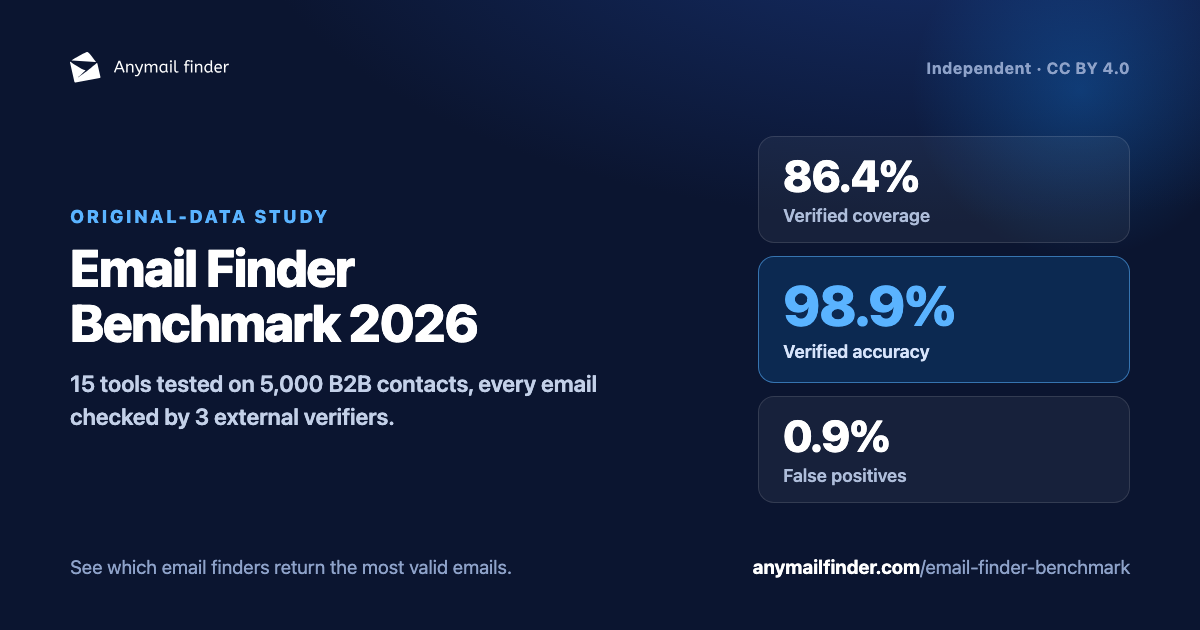
Download the summary card (PNG, 1200×630) - free to embed when citing this study.
Key findings to cite
Methodology in one line
Every tool got the same contact file with all fields mapped; every returned email was judged by a BounceBan + ZeroBounce + MillionVerifier panel (2-of-3 consensus; BounceBan adjudicates catch-all). Not a live send-test - emailing 5,000 people without consent would breach GDPR and similar laws, so the verifier panel is the compliant alternative.
Data licensed CC BY 4.0 - cite or reuse with a link back to this page.
Test Anymail Finder on your own list
Benchmarks are useful, but your market is what matters. Upload a sample of your own list and see how many verified emails Anymail Finder finds - including the catch-all domains many tools mark risky or unknown.
Test your list for free Pay only for verified emails · see the methodology · download the datasetFAQ: email finder accuracy, coverage and verification
What was the most accurate email finder in the benchmark?
Among tools that find emails at scale, Anymail Finder was the most accurate (98.9%). Icypeas scored slightly higher (99.1%) but only returned emails for half the contacts - 49.0%, versus Anymail Finder's 86.4%.
Which email finder found the most valid emails?
Two tools stood out far above the rest: Anymail Finder (86.4% verified-valid) and one waterfall (87.1%), with the next-best finder, GetProspect, all the way back at 71.2%. The difference between the top two was send-safety - the waterfall returned false positives more than four times as often (4.0% vs Anymail Finder's 0.9%), above the bounce rate that is safe for cold email, so its extra fraction of a point comes with bounces attached. For verified emails you can send as-is, without bolting on a second verification pass, Anymail Finder found the most - and by a wide margin the most of any single-source tool.
What was the best single-source email finder?
Anymail Finder was the number-one single-source email finder in the benchmark, finding verified-valid emails for 86.4% of contacts. The next-best single-source finder, GetProspect, found 71.2%.
Why not rank only by accuracy?
Accuracy only measures returned emails. A tool can reach very high accuracy by returning fewer emails. For outbound teams, the practical question is the combination of valid emails found and bad emails returned.
Why not rank only by coverage?
Raw coverage counts every returned email, including ones that bounce. Some tools returned false-positive emails for 13-23% of contacts (FindThatLead 23.2%, Skrapp 17.5%). Ranking by verified-valid emails found - coverage that passes independent verification - reflects what you can actually send to.
How were emails verified?
Every returned email was checked by BounceBan, ZeroBounce and MillionVerifier. Standard domains used a 2-of-3 consensus rule. Catch-all domains were adjudicated by BounceBan.
Was this a live send-test?
No - and it legally couldn't be. A live send-test would mean emailing 5,000 real people who never opted in, which GDPR, CAN-SPAM and similar laws don't permit. An independent verifier panel (BounceBan, ZeroBounce, MillionVerifier) is the compliant alternative, so every returned email was judged that way; catch-all verdicts were verifier-panel based, not live send-tested.
Did Anymail Finder judge its own results?
No. Anymail Finder's own engine was never used to judge any result. Every returned email, including Anymail Finder's, was scored only by BounceBan, ZeroBounce and MillionVerifier.
Can I download the dataset?
Yes. The anonymized dataset - 5,000 contacts and each tool's verdict - is available as a CSV download under a CC BY 4.0 licence. It excludes real names, LinkedIn URLs and email addresses.
I build an email finder - can it be included?
Yes. We want this benchmark to cover the whole market, so if you run an email-finding tool and would like it tested in the next edition, email team@anymailfinder.com and we will add it.
Glossary: email finder benchmark terms
- Accuracy
- Verified-valid emails divided by all emails a tool returned. A tool can post high accuracy by returning only the easy emails, so read it alongside coverage.
- Bounce rate
- The share of a send that fails to deliver. Mailbox providers use it to flag senders, so cold-email lists should generally stay under 2%.
- Catch-all (accept-all) domain
- A domain that accepts mail to any address, so standard verification cannot confirm a specific mailbox. Most verifiers return a "catch-all" status and stop; here BounceBan adjudicated these.
- Coverage
- The share of contacts a tool found a verified-valid email for - the benchmark's primary measure of reach.
- False positive
- An email a tool returned that failed independent verification, expressed as a share of the 5,000 contacts. To estimate the bounce rate of sending everything a tool returned, use 100 minus accuracy instead. A clean list keeps this near zero.
- Not found
- A contact a tool returned no email for. Not-found figures for every tool are in the downloadable dataset.
- Single-source and waterfall
- The two tool types. Single-source tools find emails from one source - their own engine or a licensed database. Waterfalls aggregate several paid sources in sequence.
- Verified-valid
- An email confirmed deliverable by the independent verifier panel, not by the tool that found it.